ARCHIVA
WEB PAGE TEXT CAPTURE
INCLUDED ONLY IN ARCHIVA PLATINUM
(NOT INCLUDED IN PREMIUM)
|
Archiva Web Page Text Capture lets you easily capture the content of virtually any kind of web page, and save it in a variety of different formats—to a database, to the extended clipboard, or to a regular Nota Bene file. It extends the Archiva capture/parsing technology beyond the bibliographic capture that is characteristic of the other modules to entirely new realms—on-line newspapers, movies reviews, blogs, recipes, commentary, manuals, and the like. Quite literally, virtually the only limit is your imagination.
Archiva Web Page Text Capture:
1. Comes predefined with rules for some sample sites (mostly on-line newspapers and magazines), enabling
very specific parsing/structuring of the data from those sites
2. Provides a more general—but still very useful—level of parsing/structuring for all other sites (for which
site-specific rules have not yet been written), in two categories:
• User-designated sites—you can instruct Archiva to capture text from only those sites which you
explicitly specify (by listing their URL’s), thus excluding all others
• All other sites—alternatively (or in addition), you can have Archiva automatically capture data from
any web site on which you select and copy text
3. Is designed as an open system, so that users can write their own capture/conversion rules, thus
effectively moving any site from the second category to the first
| There are literally millions of different web sites which Archiva users might want to visit. And each Nota Bene user might want to use the data from the sites of interest to them in different ways. That’s why we designed Archiva Web Page Text Capture (as we did all Archiva modules) as an open system. The introductory sample rules are provided as a template for how you might parse data—either by adding new sites that parse data in the same way as our selected predefined sites, or by structuring it in an entirely different way. Best of all, we’ve designed the system so that the data from even “unsupported” sites—those for which neither we nor Archiva users have written rules—will still be retrieved in a very useful way.
|
The process is simple:
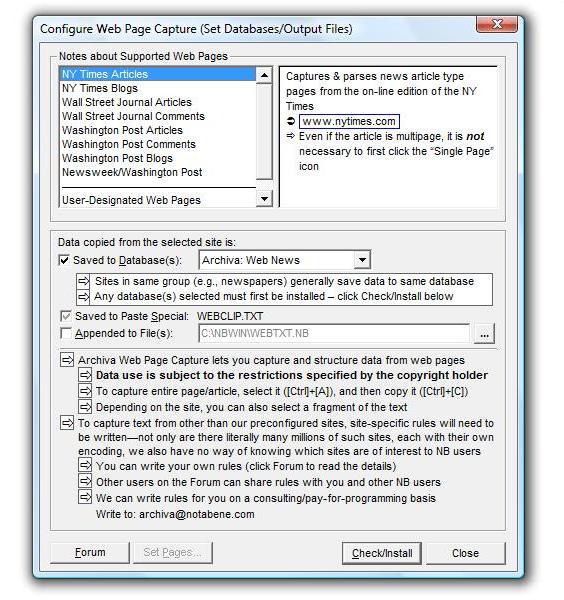
Go to Tools, Archiva, Configure Web Page Capture, and specify how you want the system to work
Once configured, whenever you find a page whose text you want to save, select it with Ctr+A, and
then copy it (Ctrl+C)
The results will be automatically written to the selected destination
|
The Archiva modules work together to capture the full range of regular and bibliographic text, in the following sequence, and in the manner indicated:
| 1
|
Predefined Web Pages
INCLUDING:
NY Times Articles & Blogs
NY Times Blogs
Wall Street Journal Articles
Wall Street Journal Comments
Washington Post Articles
Washington Post Comments
Washington Post Blogs
Newsweek/Washington Post
|
Captures the following specific information:
(results may vary depending on the site)
URL
Source (e.g., Newsweek/Washington Post)
Date accessed
Date published on web; date of printed edition
Title
Author(s)
Author information
Filing location
Section (of newspaper)
Full annotation, complete with all hyperlinks
|
| 2
|
User-Designated Web Pages
Archiva lets you specify the web pages from which you want all copied text saved
For example, you might want to save text you select and copy when browsing:
Craigslist
Netflix
Recipes from Cooks.com
Option: Archiva can save a “Recent URL” list—all the web pages from which you have tried to copy data
This facilitates adding of URL’s to your preferred URL’s list (you can simply select them, rather than typing them in)
|
Captures the following information:
URL
Source
Date accessed
Title (if using Internet Explorer)
Full annotation, complete with all hyperlinks
Unlike the predefined sites, Archiva does not contain any site-specific rules to parse this text. Instead, it takes the selected text (this can be the entire page), strips out the known-to-be-irrelevant HTML encoding, and treats that as the annotation. (Some unwanted HTML code may remain, depending on the site.)
|
If you want to “parse” the text more fully, either to match the fields in the predefined sites, or in a different format for a different use and/or destination, you can write your own capture rules.
|
|
| 3
|
Bibliographic Citations
|
See Archiva Articles
|
| 4
|
All Other Web Pages
Archiva lets you capture anything you copy on any web page, even if you have not specified its URL in the URL list
|
Capture rules/options identical to #2 above
Captures the same information
Can be customized in the same way
| |
While bibliographic citations captured by Archiva Articles always get written to an Archiva bibliographic database, you have a choice—in any combination—as to where you want text captured from a web page to be saved:
| 1
|
Database (IbidPlus)
Ideal for structured (field-oriented) data to search and/or sort, or if you want to produce output in different formats (using IbidPlus’ customized form files)
|
|
Option
(can de-activate)
|
Archiva can save the captured text to an IbidPlus database
All Archiva destination
databases must first
be configured/installed
(see below)
Archiva comes with a
few predefined non-
bibliographic data-
bases designed for
Web News capture
Destination databases
can be site or group
specific (see below)
If saving to a data-base, you can:
View the results
Make any edits
Select/append to
another database
|
| 2
|
Paste Special
| Makes parsed text (without HTML encoding) available for insertion into an NB file
|
|
Required
(cannot de-activate)
|
A converted/parsed copy of the text (from the last web clipboard copy) is saved to Paste Special
The unconverted and unparsed text (for example, the full original HTML code) is available on regular Paste, as it was previously
| To insert into file:
Go to Paste
Special
([Ctrl]+[Shift]+[V])
Select the Archiva
Data option
Click OK
|
| 3
|
Append-to File
Ideal if you want to use Orbis to search all the material you copy from the web
|
|
Option
(can de-activate)
|
Appends the results of every web copy to the designated file(s)
Text of each distinct
copy operation
is separated by NB
page breaks («PG»)
Destination files can
be site or group
specific (see below)
To open file(s):
Go to File, Open
and select file
Or add to Quick
Open ([Ctrl]+[F9])
for easier access
|
| |
|
|