ARCHIVA
ISBN CONVERTER
INCLUDED ONLY IN ARCHIVA PLATINUM
(NOT INCLUDED IN PREMIUM)
|
Archiva ISBN Converter builds Ibidem records out of ISBN numbers. You can type these in, or—more easily—paste them in (even many at a time). You’ll find that there’s probably no easier way to build a database. But what makes Archiva ISBN Converter really shine is coupling it to a barcode scanner, especially one that can operate without being connected to your computer.
Using a scanner with memory opens up a whole new world of possibilities. You can scan—and thus build an Ibidem database from—books:
In your personal library (virtually all books published in the last few decades have barcodes printed
on the back cover)
In a library
In a bookstore
At an academic convention (think how much easier it would be to simply go from booth to booth
scanning in books that interest you, rather than having to pick up the catalogs at each booth)
|
Regardless of how you proceed, the process is simple:
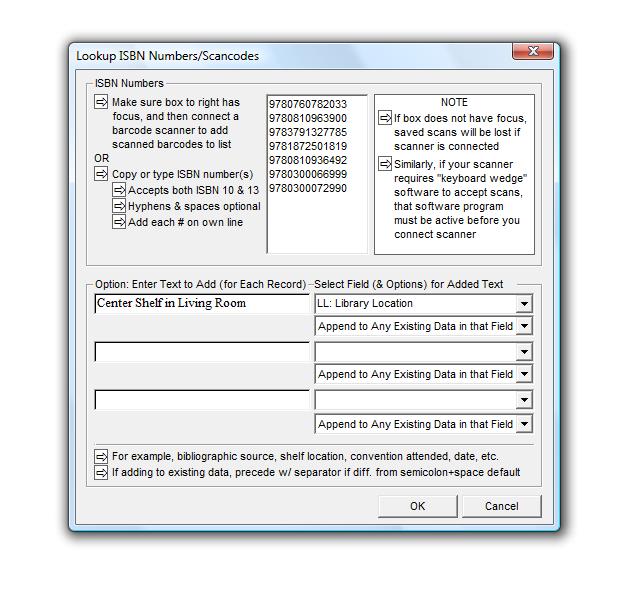
Go to Tools, Archiva, Convert ISBN Numbers
When the ISBN input box has focus
• Plug in the barcode scanner, and scan or download previously scanned items
OR
• Type or paste in ISBN numbers (either ISBN 10 or 13 format)
Click OK to have Archiva build ful Ibidem records from the ISBN numbers
View the results in the Archiva Scanned/Typed ISBN #’s Search Results database
Make any edits that are required
Select the ones you want to append to your permanent Ibidem database(s)
|
|
When building records from ISBN numbers, you can also have the option of typing in any optional text that you want to have added to specific fields. For example, if you are scanning in barcodes while cataloging your personal library, you might want include information regarding location (for example, middle shelf in study), as well as the date (February 2009).
You can add data in up to three fields, of your choosing. The text you specify will either:
Replace any other text that might have been output into that field during the conversion process
Be appended to any data that already exists in that field
Be add only if there is no text already in that field
|
The Archiva ISBN Converter was designed for use with barcode scanners. It should work with any barcode scanner that (1) can scan in ISBN barcodes, and (2) which does so while functioning as a “keyboard wedge.”
While lots of scanners meet those conditions, the LaserChamp scanner and software bundle represents the best value in the market:
The standard model offers the significant advantage of being able to work in
remote/batch mode (you can take the almost cell-phone size scanner
anywhere—to the library, a convention, or to any room of your house),
capturing up to 4000 scans before plugging it in to dump the captured
scans
A blue tooth version is available for those who want totally wireless
capability
Unlike most other scanners, it comes with advanced software that prevents
loss of scans if the scanner is plugged in when focus is not in the
Tools, Archiva, Convert ISBN Numbers text box
You can get special Nota-Bene-ready versions of these at:
Standard remote & tethered model
Wireless bluetooth version

| |
|


