NOTA BENE

A REVOLUTIONARY NOTE-TAKING, REFERENCING, & WRITING SYSTEM


   Home  Program   Synergy        Community Journey        FAQ    Tour  Platforms


ARCHIVA
ADDED BONUS FEATURES
 

INCLUDED IN ARCHIVA PREMIUM & ARCHIVA PLATINUM
 

Archiva is a life-changing experience

View instructional video

1
Smart Clipboard Capture


In addition to journal articles in subscription databases, Archiva Premium can capture data from additional web sites of interest:
  • Library of Congress
  • WorldCat
  • Google Books
  • Amazon

    All you need to do is to select the work or works displayed in your browser window (use [Ctrl]+[A] to select everything), and then copy it [Ctrl]+[C]. Everything gets added to your Archiva Captured Records database.

    The last three sites—while extremely useful (see below)—all share one defect, namely that the bibliographic data that is displayed is not adequate for scholarly citation purposes:
  • Google Books lacks place of publication
  • Worldcat author data is often incomplete
  • Amazon does not include various bits of information

    Archiva Premium uses its “smart clipboard catpure” to automatically supplement/correct the missing/inaccurate data with full/correct Library of Congress data.

  • 2
    Direct Link to Web Sites


    With Archiva Premium installed, you can go directly from any existing Ibidem record to the corresponding web page in:
  • Library of Congress
  • WorldCat
  • Google Books
  • Amazon

    These direct web links (invoked through the Ibidem Links menu) are active for any work which has an ISBN number in the Ibidem record
  • Archiva Premium can also try to retrieve an ISBN number for works which currently lack them

  • 3
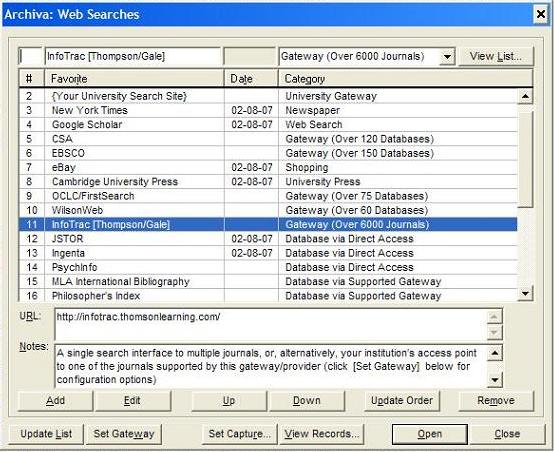
    Search the Web (Web Favorites)


    Archiva opens the way for you to access your favorite search sites from within Nota Bene and/or Ibidem, such as:
  • Your university search log-in page (log-in still required)
  • Academic research sites
  • University presses
  • Library of Congress
  • Your personal web page
  • Google Scholar (to find articles on a particular topic)
  • Google Books (to find out something more about a book)
  • WorldCat (to find the nearest libray that has a particular book)
  • Amazon (to buy a book)
  • On-line newspapers you read
  • Shopping sites
  • Anything else


    Archiva’s new web search tools let you:
  • Access your preferred web sites using the keyboard, and with far fewer keystrokes or mouse
        movements
        • Use Ctrl+Shift+O, followed by the number of the item in your favorites list, followed by Enter
        • To access the most recently accessed site again, simply press Ctrl+Shift+O, then Enter
  • Add up to 1000 different favorite sites
  • Sort the favorites list by
        • Name
        • Date Last Accessed
        • Category (the equivalent of Folders in Internet Explorer)
  • Specfy which of the above sequences you want the list displayed in the next time you open it
        • The most recently accessed site will be highlighted
        • You can combine the functionality of a Favorites list and a most-recently accessed
          drop-down lists (simpy arrange the list by date last Accessed)
  • Edit the URL for the favorites (and not only the name that is displayed)
  • Add a comment, description, or other note for each favorite


    NOTE: Archiva does not itself give you access to any web search site to which you do not already, independently of Archiva, have access—if you needed a subscription to access a site before Archiva, you will still need that same subscription with Archiva

  •