NOTA BENE

A REVOLUTIONARY NOTE-TAKING, REFERENCING, & WRITING SYSTEM


   Home  Program   Synergy        Community Journey        FAQ    Tour  Platforms


NEW in VERSION 9.0
LANGUAGE SELECTION

NEW!
Right-Click Option
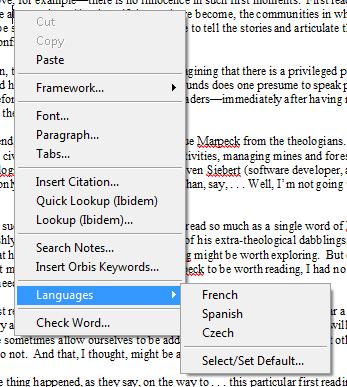
It is now much easier to select languages and (for Lingua users) alphabets

The options on the [Ctrl]+[Shift]+[L] Language Selection dialog:

  • Have been enhanced to enable changing
        a selected block to the specified language
  • Are now made available to Scholar’s
        Workstation users, who can now select
        different languages within the Roman
        alphabet

    It is now much easier to change languages within an alphabet, using the Right-Click Languages pop-up menu:

  • While keyboard shortcuts enabled Lingua
        users to easily switch alphabets, it was
        more difficult to switch languages within
        an alphabet—this task is now simplified


    Marking text as being in a particular language (even if you enter that text using the same keyboard layout as you use for your primary language) is essential if you want to enable Nota Bene’s automatic language-switching, either during dynamic on-screen spelling, or when using the traditional file/block spelling. These enhanced features make this process much easier.


  • 3 MORE REASONS TO UPGRADE
    Click the appropriate number below to read more about the benefits of version 9.0

    1
    Continue to Enjoy
    the
    High-Quality
    —and Still Free—
    Technical Support
    You’ve Come
    to Expect

    2
    Speed the Release
    of the
    Much Anticipated
    Next-Generation
    Version
    You’ve Been
    Waiting For

    3
    Lock in Savings
    on the
    Essential
    Writing & Research
    Tools
    You’ve Come
    to Rely On