NOTA BENE

A REVOLUTIONARY NOTE-TAKING, REFERENCING, & WRITING SYSTEM


   Home  Program   Synergy        Community Journey        FAQ    Tour  Platforms


NEW in VERSION 9.0
IBIDEM

NEW!
Smart Database Locator
Ibidem automatically finds the proper database, even if on a system where the database is installed in a different folder


You’ll never need to worry about moving files between different machines in which the database is installed in different locations—Ibidem will automatically take care of these differences for you.

NEW!
Smart Record Locator
Ibidem now features advanced record identification—it can locate the record you intended to cite in a file even if the record number has changed


When updating citations in a file, Ibidem will report the status of all records (with color codes), including a count of:

  • Regular dynamic records (all data—year,
        author, title, and record number—in
        file matches information in database)
  • Non-dynamic records (also with full
        match)
  • Exact match—author, title, and year data
        in file match record in database, but
        record numbers (in file vs. database)
        do not match
  • Close match—citation data in file closely
        matches data from another record in
        database with a different record number
  • Record not found

    The citations in the file are identified using the same color code:

  • Blue—Regular dynamic citations
  • Green—Non-dynamic citations
  • Maroon—Exact match
  • Pink—Close match
  • Red, with box—not found
  • You’ll never need to worry about keeping data- bases in synch again—you can now work on the same database on different computers, adding records to each, and combining them later, without needing to worry about synchro- nizing the two databases. And you can now share bibliographies with colleagues without any similar worries.


    NEW!
    Smart Duplicate Locator
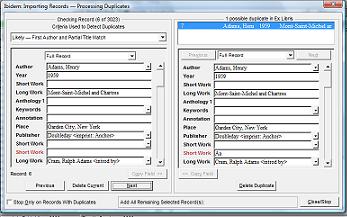
    Ibidem now lets you find duplicate (exact or approximate) records in a database, using the following criteria:
  • Likely — First Author and Partial Title
        Match
  • Approximate — First Author and Any
        Other Field Match
  • Lax — Partial Title Matches
  • Lax — First Author Matches

    Once duplicates are found (Ibidem shows you a list of all potential duplicates, which you can display in detail one at a time), you can:

  • Easily see precisely where the records
        differ (the name of the fields in question
        are displayed in red)
  • Keep both current and duplicate(s)
  • Copy data in specified fields from
        record to record
  • Delete the duplicate(s)
  • Delete the current record (retaining
        the duplicate[s])


  • ENHANCED!
    Record Deletion
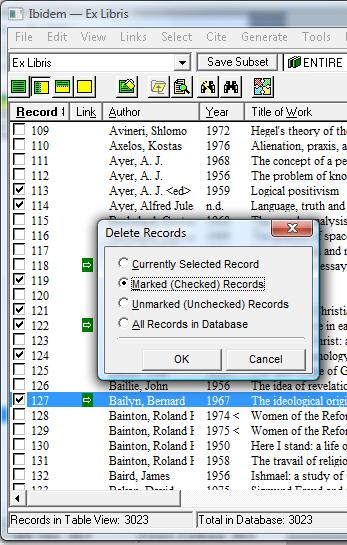
    New options have been added to make it easier to remove unwanted records, including deleting:
  • The current record
  • All marked records
  • All unmarked records
  • All records


  • ENHANCED!
    Record Copy
    You can now easily copy records to a different database


    3 MORE REASONS TO UPGRADE
    Click the appropriate number below to read more about the benefits of version 9.0

    1
    Continue to Enjoy
    the
    High-Quality
    —and Still Free—
    Technical Support
    You’ve Come
    to Expect

    2
    Speed the Release
    of the
    Much Anticipated
    Next-Generation
    Version
    You’ve Been
    Waiting For

    3
    Lock in Savings
    on the
    Essential
    Writing & Research
    Tools
    You’ve Come
    to Rely On