NEW! On-Screen Spelling
NB can now flagged unrecognized words on screen, using either:
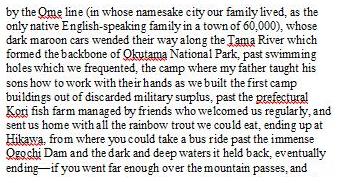
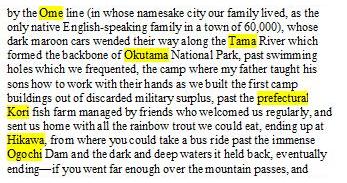
the standard red “squiggle”
a yellow background
COMMENTS FROM BETA TESTERS:
“I love the choice between yellow and red squigglies for misspelling!”
“I've turned on auto-spell's option to show misspellings as red squiggle or yellow background. (I like the yellow background, please keep it!)”
|
You can toggle on-screen mode on/off with [Ctrl]+[Shift]+[Y] (Squiggles/Yellow On/Off)
COMMENT FROM PRE-RELEASE USER:
“Love the keyboard shortcut for turning spelling squiggles on/off. Generally love the way NB lets you forget about the mouse.”
|
A set of new right-click menu options let you:
Ignore the word for the session
Add it to your primary user dictionary
Display a list of suggested alternates
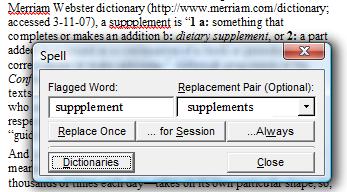
The right-click replacement pop-up dialog lets you choose from among the suggested alternates and:
Replace once
Replace for session
Add replacement pair to user dictionary
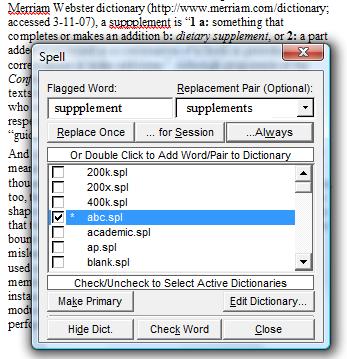
You can also expand the dialog to enable selection of additional options for user dictionaries:
Select which user dictionaries to have
loaded (see below)
Change the primary user dictionary (the
dictionary to which words and/or pairs
are added)
Edit the dictionary
Lookup the current word in all user
dictionaries, to check if it appears in
multiple dictionaries, or in multiple forms
(for example, with different casing) in a
particular dictionary
|

|
ENHANCED! File Spell
The option to spell the file automatically in sequence, as in earlier version, has been significantly enhanced:
The dialog is now “modeless”—you can
switch between it and the file without
exiting spelling mode
You can edit the surrounding text
(correcting any other mistakes)
You can type the replacement word
in the text, in the dialog, or in the
replacement-word list
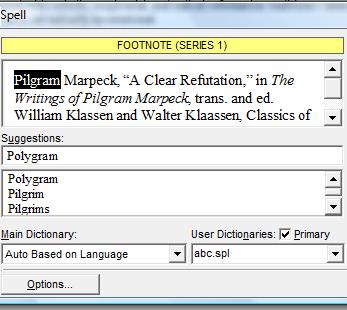
Spelling errors, including the full context,
are now shown in the dialog, meaning that
footnotes/endnotes, labels, etc., do not
need to be opened/closed
You can easily change which user
dictionary you want to add words to
(that is, which dictionary is primary)
You can create new or edit existing user
dictionaries
COMMENT FROM BETA TESTER:
“I really, really like the new spell-check popup and its options.”
|
COMMENT FROM PRE-RELEASE USERS:
“I love the new spell checking interface! (And I'm sure we all do.)”
”I've fallen in love with the new spell checker already.”
|
|
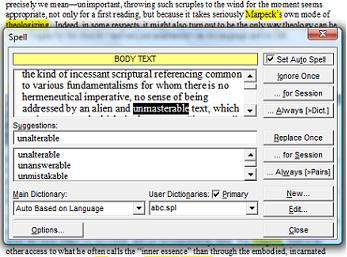
FULL SIZE FRAGMENT OF DIALOG SHOWN ABOVE,
WITH FLAGGED WORD IN FOOTNOTE
|
NEW!
Multilingual Spelling
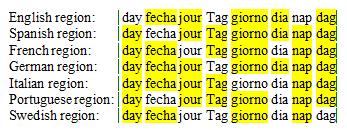
NB now supports multilingual spell checking:
NB will automatically switch dictionaries
based on embedded language
(«LA....») commands
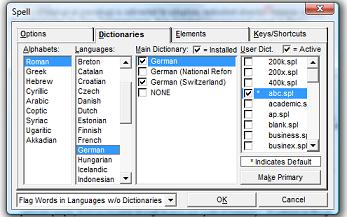
Up to 8 different dictionaries can be active
simultaneously
Entries in user dictionaries are also
language-specific
Dictionaries are currently available for the following:
Afrikaans
Catalan
Danish
Dutch (Belgium, Netherlands)
— Restrictive Speller
Dutch (Belgium, Netherlands)
— Permissive Speller
English (Australia)
English (Canada, Caribbean, Jamaica,
New Zealand, United States)
English (Ireland, South Africa, United
Kingdom)
French (Belgium, France, Luxembourg,
Switzerland)
French (Canadian)
German (Austria, Germany,
Liechtenstein, Luxembourg)
German — National Reform
German (Switzerland)
Icelandic
Italian (Italy, Switzerland)
Norwegian (Bokmal)
Norwegian (Nynorsk)
Portuguese (Brazil)
Portuguese (Portugal)
Spanish (Argentina, Bolivia, Chile,
Colombia, Costa Rica, Dominican
Republic, Equador, Guatemala, Mexico,
Panama, Paraguay, Peru, Spain,
Uruguay, Venezuela)
Swedish
Turkish
Other dictionaries under exploration/testing include:
Finnish
Czech
Hungarian
Polish
Arabic
Greek (Modern)
Hebrew (Modern)
|
COMMENT FROM PRE-RELEASE USERS:
“Thank you for a dream come true - a truly multilingual Lingua Workstation - I really am thrilled!”
“I love the easy interface for configuring dictionaries for different languages and the options for different versions of each language: e.g., German which I'll use a lot.”
“MS Office give you English, French and Spanish, but you have to pay for German by buying a whole package, which I've never bothered with. You're a class act making these all freely available!”
|
|
NEW! Spell Options
In addition to the existing spell options (all of which are retained), you can now:
Ignore URL’s and filenames
Cancel automatic replacement of
replacement pairs from user dictionary
when regular file spelling
Auto correct casing errors when typing
(from “WHen” to “When”)
Enable spelling of active Ibidem field
Distinguish error and auto-replace beeps
Assign sounds to both beeps (using
any WAV file)
|
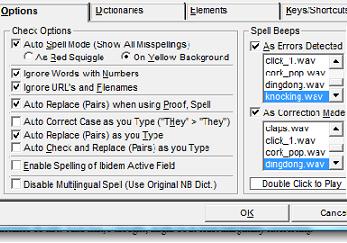
FRAGMENT OF SPELL OPTIONS DIALOG
|
ENHANCED!
User Dictionaries
You can now:
Load multiple user dictionaries
simultaneously
Have large user dictionaries (we have
tested dictionaries as large as 400,000
characters)
Add words to a dictionary (from the
right-click menu) more easily
Change the primary dictionary (the
dictionary to which words/pairs are
added) more easily
Edit a user dictionary more easily
Two new supplemental dictionaries are supplied (both extend the English dictionary):
ACADEMIC—terms in the humanities
and social sciences
AUTHORS—selection of names of well-
known authors in the humanities and
social sciences
(These dictionaries will be updated/expanded in new releases)
Entries to user dictionaries are also now language-specific—dont can remain dont in French, while expanding to don’t in English
|
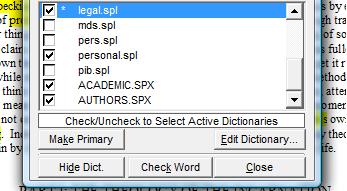
FRAGMENT OF RIGHT-CLICK REPLACE/CHECK DIALOG
|
ENHANCED!
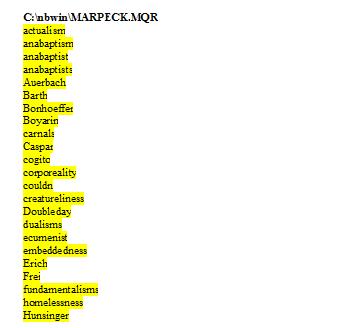
Save Words to File
You can now write all unrecognized words to a file so that you can:
review the words
facilitate creation of a user dictionary:
|
|


