The date inserted in an open document can be automatically updating or static. The today command is an immediate command that enters the current date as text that will not be updated. The da command enters a command in the file that is automatically updated whenever the file is opened, edited or printed. The date will be in the default format unless you specify a different format. See Date/Time Default Format.
To insert today's date as text that will not be updated:
| 1 | Place the cursor at the point where you want to insert the date. |
| 2 | Press F9 to access the action line |
| 3 | Type today (or today followed by a space, then the format as described below). |
| 4 | Press F10 to insert the date. |
To insert a command in the file that will display the date, and automatically update to the then-current date whenever the file is opened, edited or printed:
| 1 | Place the cursor at the point where you want to insert the date. |
| 2 | Press F9 to access the action line |
| 3 | Type da (or da followed by a space, then the format as described below) |
| 4 | Press F10 to insert the date. |
The formatting of the date will reflect the Nota Bene default settings, unless you specify a different format.. These default settings can be changed by clicking Tools, Preferences, Date & Time. You can also specify the formatting of the date without changing your default settings by adding date formatting specifications to the date command (today or da). The date formatting specifications must be inserted after the date command, with a space between the date command and the formatting specifications. Example: today dd-Mmm-yy
The formatting of the date can be specified using any punctuation and M's for month, D's for day and Y's for year as shown below:
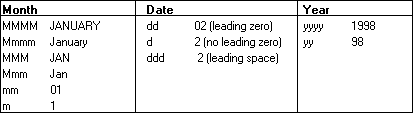
Examples: dd-Mmm-yy = 02-Jan-99 Mmmm d, 'yy = January 2, '99 Note that since Nota Bene automatically inserts smart quotes, you must type Ctrl+' to insert a straight quote as used in the year in the previous example.
See also:
Time: NOW, TM and SEC commands