|
Open the Print Envelope dialog by clicking File, Print Envelopes.
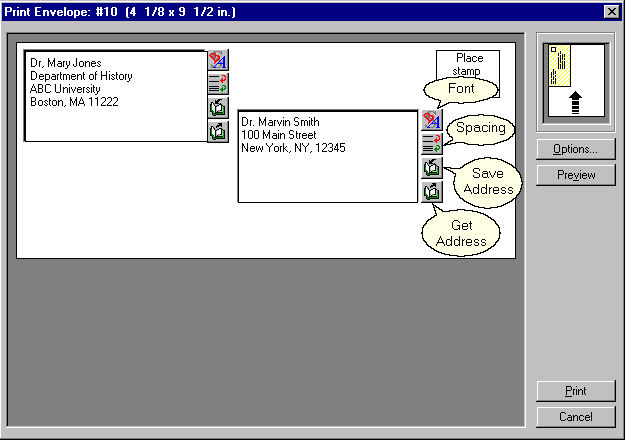
Sender's address
| The sender's address, or return address, is inserted in the upper, left field. |
| • | Click the Font button to change the font and related properties |
| • | Click the Spacing button to change line spacing properties |
| • | Click the Save Address button to save the entered address for use with envelopes created later |
| • | Click the Get Address button to retrieve a previously saved address |
Recipient's address
| The recipient's address is inserted in the lower, right field. |
| • | Click the Font button to change the font and related properties |
| • | Click the Spacing button to change line spacing properties |
| • | Click the Save Address button to save the entered address for use with envelopes created later |
| • | Click the Get Address button to retrieve a previously saved address |
Options
| Click Options to select the envelope size, paper source and feed method |
Preview
| Click Preview to see what your printed envelope will look like, and to make final adjustments to the position of the Sender and Recipient fields. |
| • | Use the slider bars on the right of the preview envelope to change the envelope layout before printing |
| • | To accept your changes, click OK |
| • | To undo all changes, click Cancel |
| • | To restore the default settings, click Default. |
Print
| Click Print to print the envelope. |
Cancel
| Click Cancel to close the dialog without printing. |
|